Saccades are like OLED-jiggle

Saccades definition

Saccades are a rapid eye movement (not to be confused with deep-sleep) where the eyes will make quick, small jerky (hence the name, derived from French) movements, darting back and forth, generally horizontally, even when you try to look at a fixed spot.

Proposed explanations

The Wikipedia page for saccades gives some explanations for their function, including building a “three-dimensional map” and gathering more information by expanding the detailed-vision area since the fovea is relatively small. However, both of these explanations are specious.

Counters to explanations

If the purpose is to build a mental-map, then why do they still occur when you are specifically attempting to stare at a fixed point? What purpose does it serve to have the brain induce an involuntary behavior that opposes your intentions? That’s not very good evolution.

If the purpose is to counter the fact that the high-detail fovea only covers a relatively small portion of the visual-field, then why did we evolve to do this complex and counter-productive behavior instead of just evolving a larger fovea? That’s not very good evolution.

OLED functionality

There’s a more logical answer that makes sense. The retina is like an OLED screen.

An OLED screen works differently from an LCD/LED screen. An LCD screen works by controlling the orientations of many tiny crystals in the liquid layer inside the screen, which can either allow or block light that is provided by an LED (formerly fluorescent) backlight. An OLED screen on the other hand, has many tiny LEDs that are individually controlled to actually emit light themselves, thus providing a much better image, both in terms of color, but also with true blacks since there’s no light being emitted at all, which also has the benefit of reducing power consumption.

Burn-in

Sounds great, huh? So why haven’t OLEDs replaced ALL TVs and monitors? Like with everything else, OLEDs aren’t perfect and do have a downside. In this case, it’s that OLEDs are susceptible to screen burn-in just like good old-fashioned CRT screens. What happens is that if an OLED is left on for too long, it can “burn out” and get “stuck” and continue to show an image indefinitely (like when parents would tell children to not make faces because their faces could get stuck like that, but for real). There are plenty of photos of phones, TVs, and computer-monitors showing OLED burn-in of things like the clock, the news/sports chyron, the Windows taskbar, and so on.

Burn-in remediation

In the days of CRTs, the solution to prevent burn-in (other than turning the screen off) was to use screen-savers which would blank the screen (or later on, display pleasant imagery that constantly changes to prevent any of the phosphors from burning by being active for too long, or at least the proper screen-savers would, there were many that didn’t understand the purpose and showed static graphics that caused burn-in).

In the days of OLEDs, screen-manufacturers try to prevent burn-in at the hardware level by inducing a slight judder at the sub-pixel level. The image isn’t actually static, the screen will jiggle it very slightly, which is usually imperceptible without a magnifying-glass or microscope, and gets less perceptible with higher-density screens since the pixels are even smaller, let alone the sub-pixels (the individual R, G, and B components that make up a single pixel). This way, the sub-pixels are getting a varying signal instead of a constant one, and are less likely to burn in. Of course, this has varying efficacy, jiggling a static white image won’t help.

Retina functionality

The retina works in a similar way. The photoreceptors (rods and cones) will desensitize and reduce their firing rate when exposed to a constant and unchanging stimulus. That’s why if the visual-field is relatively static (like while driving on the highway), one can get “tunnel vision” where the world just turns to gray and seems to fade away, especially in the periphery.

Analogy and new explanation

This is why (micro)saccades exists, to “jiggle” the visual-field a little bit to prevent “burn in” on the retina to keep the photoreceptors firing and prevent tunnel-vision. You can still overcome it by staring intently at a very small point (if it’s too big, it’ll be harder to avoid saccades), and induce the graying, but in normal life, the saccades are what allow us to continue seeing at full-strength.

Anti-debunking

Of course, one might wonder why saccades evolved instead of just preventing the photoreceptors from desensitizing, and that’s because photoreceptors are like smoke-detectors (or Homer Simpson’s everything’s-okay-alarm) in that they work by constantly having a signal firing and input stimulus actually reduces the signal instead of boosting it. This has various effects from simply reducing energy in the default state of non-stimulation to providing for a visual system that works for both detail/color and dark/movement instead of improving one at the expense of the other.

Smugness

So saccades are just nature’s screen-saver. As usual, nature beat humans to it by a billion years.
Tue-Sat Program Setting Required

Manufacturers of VCRs have always missed something important when they designed the programming ability of their products, and modern-day DVR manufacturers are no better. It may be the case that one or two products out there have already thought of it, but at least 99.99% of them do not. The design defect in question is the day range of the programming function.

Most products allow you to choose one time, every week on specified day, every day, and every weekday (Mon-Fri). What they forget to allow is every weekday (Tue-Sat). Why would you include a Tuesday to Saturday range?

Simple. Suppose that you have two programs that air each weeknight that you want to record. One is from 11:00pm to 12:00am on channel 3 and the other is from 12:00am to 01:00am on channel 4. Programming the first one is easy enough, you select M-F/12am/1am/3. What about the second? It may be Monday to Friday nights, but technically it is Tuesday to Saturday mornings since it begins after midnight! The only option here would be to select S-S/12am/1am/4 and remember to take the tape out on the weekend.

With a T-S option, it would simply be T-S/12am/1am/4 and no extra work trying to keep it from taping on the weekend is necessary. This is why these devices need a Tuesday to Saturday program option.

*UPDATE*
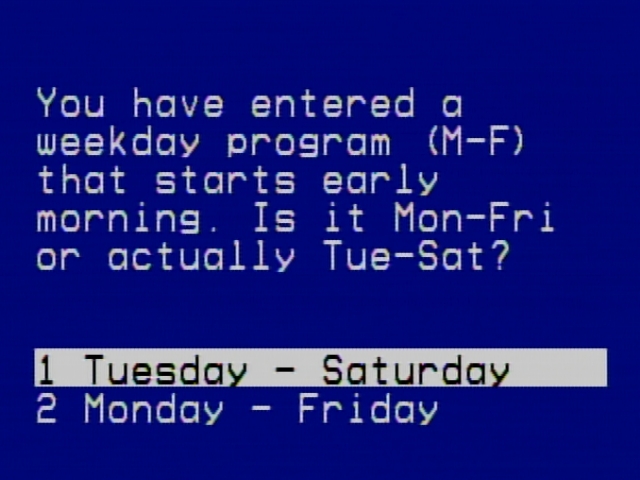
Well wonders never cease. It turns out that my very own VCRs (GE/RCA) have this exact functionality. I must never have created an early-morning, daily program because I have never seen this screen:
Daily A.M. Program Clarification Screen

Forever Lights: One Caveat

Forever Lights are a great, brilliant invention. In fact, any invention that uses alternative forms of energy are wonderful; hand-cranks, solar cells, magnets. Forever Lights—and their knock-offs—are flashlights which use one or more super-bright white LEDs instead of incandescents, which allow it to create pure, white (or bluish) light that remains cool and does not create heat, while also lasting—for all intents and purposes—forever without fear of burning out. Furthermore, Forever Lights use rechargeable lithium ion batteries instead of single-shot alkalines. Finally, the rechargeable batteries are recharged, not by plugging it into an outlet, but by simply shaking it. They have a powerful magnet inside which when shaken, passes through a tightly coiled wire. The magnetic field from the magnet passing through the coil creates electricity which charges the batteries.

To top it all off, if you get a good one (knock-offs are of poorer quality) they will also be waterproof. This makes these perfect for underwater use like in scuba diving or cave diving. A problem that many divers have feared is their flashlight batteries dying while they are down there (or other cave spelunkers above ground). With this, they just shake it a bit and they’ve got light again; wonderful. Nicer models even allow you to choose from using a single LED for less light up to three for a whole lot of light.

This is truly a brilliant device which uses human power instead of electricity. Another such device I’ve seen use a crank type device. These are great because they do not cost money for electricity or batteries, but also because since they use human power which when combined with the physical law that energy cannot be created or destroyed, just changed in it’s form, means that it is a productive way to burn off some fat.

There is one warning about the Forever Light however. Because they use powerful magnets to create the electricity for the batteries, they cannot be used while working in or around computers, televisions, or any other device that uses magnets itself. You could very well wipe or at least corrupt disks or distort screens. For these tasks, a more traditional form of light is required but for everything else, Forever Lights are marvelous.

Cheap Multi-iPod Recharger

With the growing popularity of Apple’s iPods, a booming field of iPod accessories has evolved. Unfortunately, most of these accessories tend to be on the expensive side since the logic goes that if one can afford an—expensive—iPod, then one can afford to pay a lot for it’s accessories.

A main problem with iPods is their rechargeable batteries. They have proprietary batteries built in so you cannot just pop it out and replace it. Instead, you must pay a lot of money to have it shipped to Apple (or some other unauthorized third party) to replace it for a fee; some rechargeable. Even when the batteries are still good and can be recharged, there are not too many options on actually doing so.

Some people resort to purchasing expensive power adapters that allow you to plug an iPod into the wall to charge it. Most people just plug it into their computer.

There is another way, a way that allows you to charge the iPod anytime, anywhere without the need for a computer—just an electrical outlet—as well as being cheaper than an adapter: a powered USB hub.

The best way to charge an iPod is to purchase a USB hub. These are essentially USB splitters that allow you to daisy chain multiple USB devices into a computer. Using one of these you can simply plug the iPod’s cable (or the iPod Shuffle itself) into the hub and plug the hub into an outlet. This has a few other benefits as well. Because you are using the hub only for charging (no data transfer), you do not need USB 2.0, so a cheaper 1.0/1.1 hub will do. Since the whole purpose of a hub is to allow multiple devices to connect, you can charge multiple iPods at the same time.

So instead of getting costly power adapters or using a whole computer, just get a single, small, inexpensive, USB hub to quickly and easily charge multiple iPods at the same time.